
Before trying these steps, try using another browser (Firefox, Edge, Safari, etc.) to login
If that works, then it is strictly a Chrome issue, which you can follow the steps below to diagnose and correct the issue.
Step 1 — Try an Incognito Window
- Open Chrome
- Click the 3 dots in the top-right corner
- Click “New Incognito Window”
- Go to https://analytics.planguru.com/login and try logging in again
- If it works there, the problem is probably old cookies or browser data.
Step 2 — Clear the Website’s Cookies
- Open https://analytics.planguru.com/login
- Click the little icon left of the website address (it may look like sliders, a lock, or an info icon)
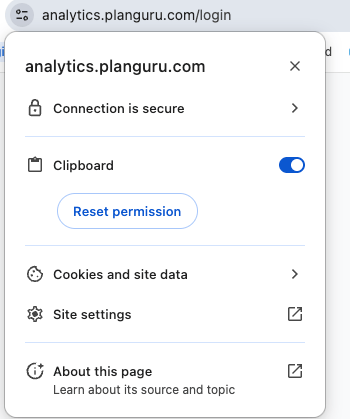
- Click “Cookies and site data”
- Delete (Click the Trash Can) anything for the app and the login provider (Google, Microsoft, Okta, etc.)
- Close Chrome completely
- Open Chrome again
- Try logging in
Step 3 — Make Sure Cookies Are Allowed
- In Chrome, click the 3 dots in the top-right corner
- Click “Settings”
- Click “Privacy and Security”
- Click “Third-party cookies”
- Allow third-party cookies
- OR add the website under “Sites allowed to use third-party cookies”
- Try the login again
Step 4 — Turn Off Extensions for a Minute
- Click the puzzle piece icon in Chrome
- Click “Manage Extensions”
- Turn OFF ad blockers, privacy extensions, and VPN extensions
- Try logging in again
Step 5 — Check the Computer Time
Windows:- Right-click the clock
- Click “Adjust date/time”
- Turn on “Set time automatically”
- Open “System Settings”
- Go to “Date & Time”
- Turn on “Set time and date automatically”
Step 6 — Restart the Browser
- Close ALL Chrome windows
- Open Chrome again
- Try the login
Most Common Causes
- If Incognito works → clear cookies/cache
- If no browsers work → check the computer clock, VPN, or security software
- If only Chrome fails → extensions or cookie settings are likely the problem